
Example query
POL-204
Match the exact detail.
A title, code, or identifier can point to a precise piece of information. Exact matching helps that reference stand out.
Knowledge search
The answer might be in a conversation, a company document, or a page someone wrote months ago. Search them together with the words you remember—or simply describe what you need.
Your question is the starting point.
Exact references, remembered words, and meaning work together to find relevant information.
You don’t always remember the exact wording
People remember information differently. Insight combines several ways of finding a match, then brings those matches together in a list ordered by relevance.
POL-204
A title, code, or identifier can point to a precise piece of information. Exact matching helps that reference stand out.
approval deadline
Full-text search looks through the words in transcripts and documents, so a useful match can be found beyond the file name.
onbordng guide
Spelling-tolerant matching helps recover relevant material when a word is mistyped or only partly remembered.
What did we agree about the launch?
Meaning-based search looks for related information even when the source uses different wording from your question.
Different kinds of matches contribute to the search. You can start with the information you have and inspect the sources that look useful.
A question, a result, and the context behind it
Start with that question, without looking up the recording’s title. Insight brings the Apollo 11 conversation to the top of this search and shows the relevant excerpt beside the selected result.
The context is expanded in the screen below. Insight uses matching passages and nearby material to extract the information relevant to the question. You can understand the result before opening the full meeting, then return to the original source when you want more detail.
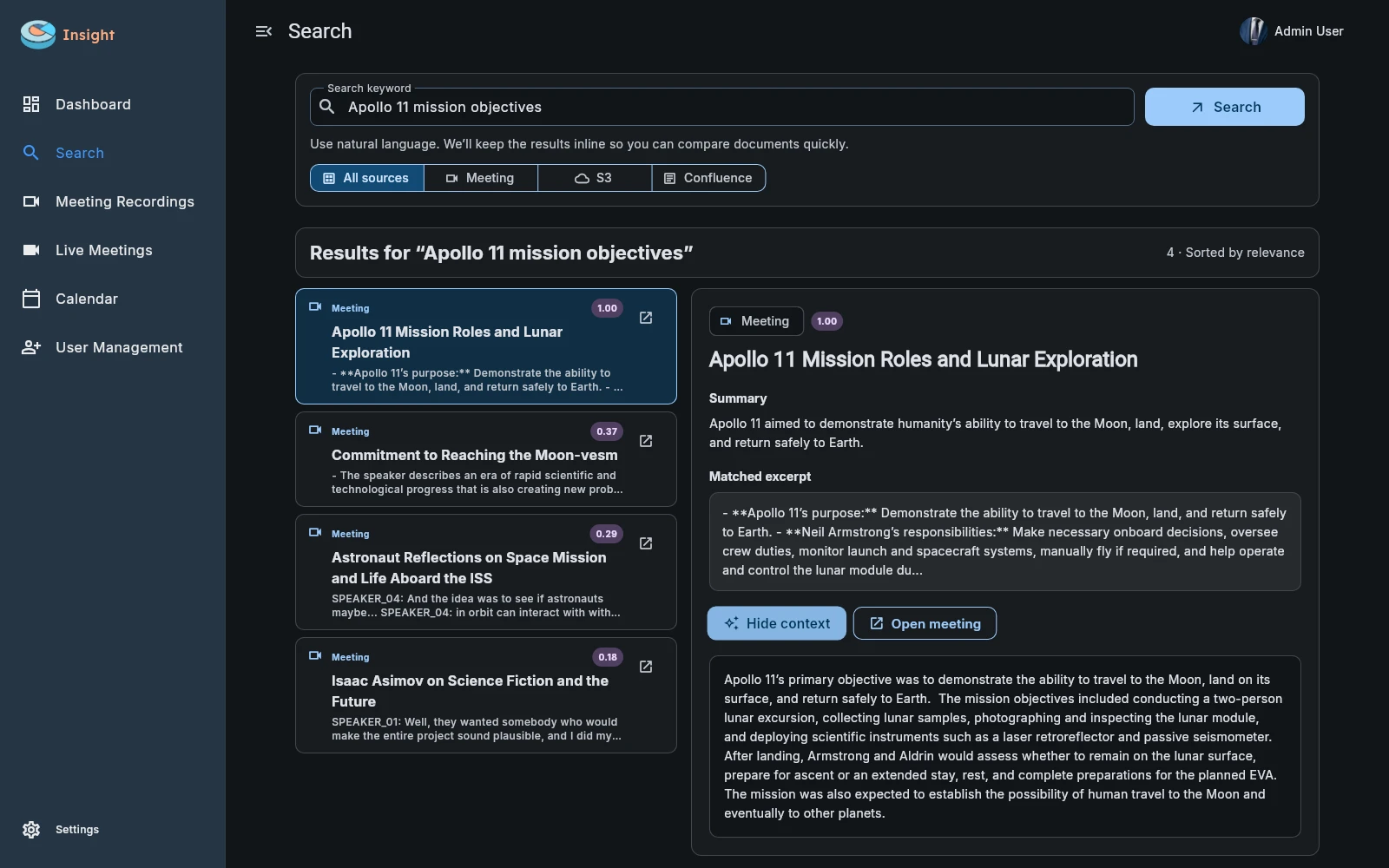
The search does not need to repeat the exact title or wording used in the recording.
The selected result shows its source, a preview, and the matching excerpt.
Expanded context focuses on the question. Open the source to continue your review.
Beyond the meeting library
A conversation explains the decision. A document defines the process. A knowledge page contains the detail. Insight makes these sources searchable together, so you can begin with a question instead of choosing which system to look in first.
Find information in indexed meetings and their transcripts. Bring earlier questions, explanations, and decisions back into view.
Search the contents of uploaded material, including PDFs, Word documents, and supported text files. Your team can maintain documents in Insight’s library.
Include pages from a connected Confluence knowledge base, so maintained guidance can be found alongside the conversations it informs.
Bring files in S3-compatible storage into the same search. This connects a widely used form of company file storage to your knowledge workflow.
Knowledge that keeps being useful
Search gives your recordings and company material a life beyond their original use. A new colleague can find earlier context. A manager can revisit a discussion. A team can locate the guidance behind a decision.
Use source filters to focus on a supported type of material, such as meetings or documents.
Changes and removals in connected sources are processed in the background to keep searchable content aligned with the current indexed material.
Each company’s search stays within its own indexed information.