
01
Roles and policies
Give people and teams the access their responsibilities require. Set company-wide or team-specific permissions, add restrictions, and limit access to a defined period when needed.
Hosting, access, and integrations
Choose where the platform runs, how people sign in, and how results reach other systems. Configure the deployment around your organisation’s infrastructure and operational requirements.
Insight supports cloud-hosted, private-cloud, self-hosted, and hybrid deployments. The location of platform components and connected services is agreed as part of the configuration.
Your deployment configuration
 Integrify InsightPeople · Knowledge · Evaluation
Connected services are configured as part of your deployment.
Capabilities
Give people and teams the access their responsibilities require. Set company-wide or team-specific permissions, add restrictions, and limit access to a defined period when needed.
Connect your company directory, including Active Directory through LDAP. Employees can use corporate credentials, while accounts and team membership stay in sync.
Let other applications request information through APIs and receive automatic notifications when supported meeting events occur. Track delivery and retry eligible notifications when a connection fails.
Make Confluence pages and files in S3-compatible storage searchable. Connected systems can also supply selected current information to give an evaluation its business context.
Separate processing services handle transcription, evaluation, search updates, and document export. Add capacity where the recording volume or review workload needs it most.
Review processing history, failures, resource use, storage consumption, and subscription limits to plan and manage platform operations.
Know when to add capacity
A team starts with a few calls. More recordings and more detailed evaluations follow. The usage view helps administrators see how that work affects processing time, storage, and allowances.
In this demo workspace, completed tasks and resource use appear together. Use that operational picture to investigate a failed job or plan the capacity your team needs next.
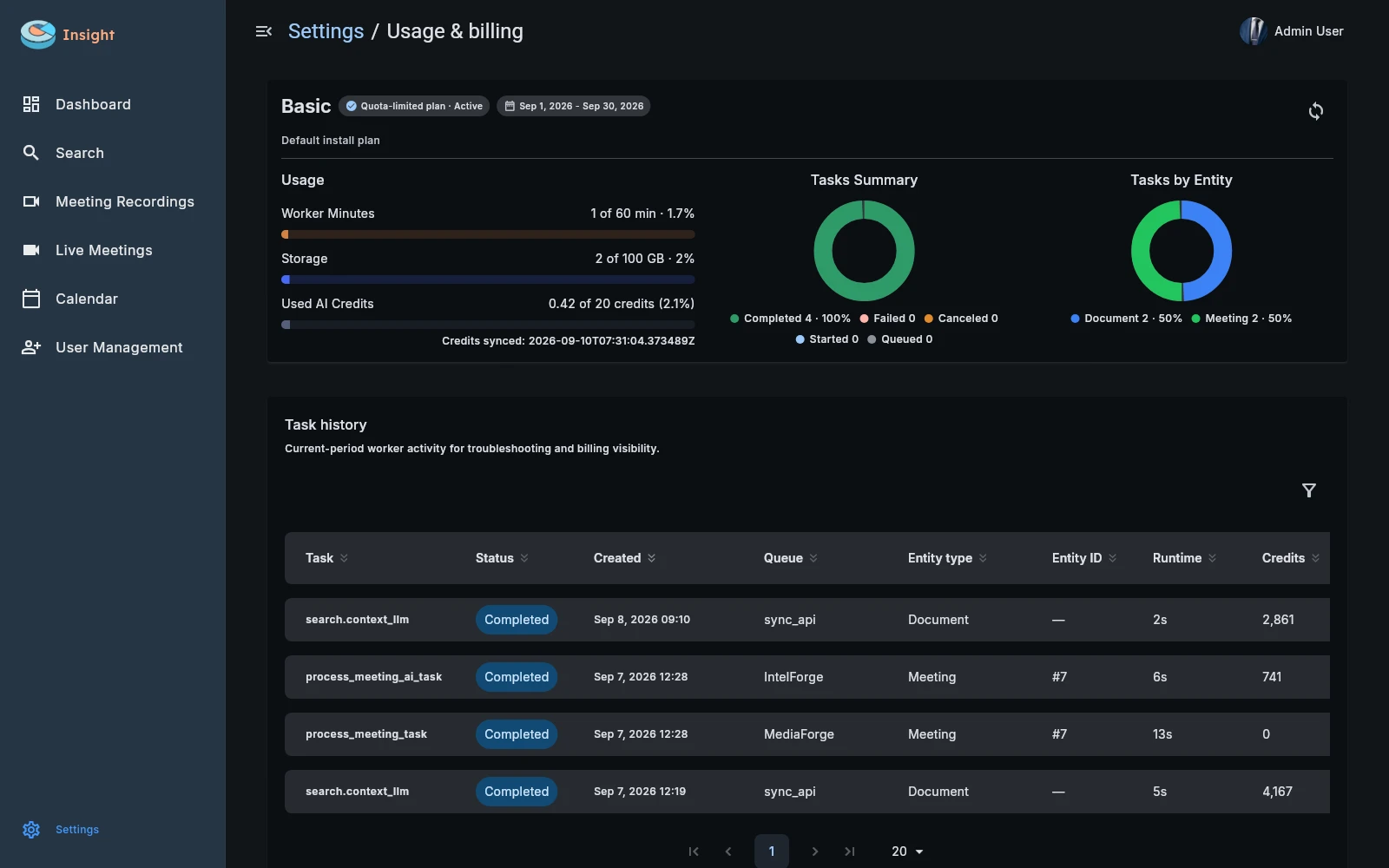
Review completed work, errors, and task history.
See storage, processing time, and recorded usage.
Size the deployment around your recording volume and review depth.
In practice
Identify hosting preferences, account directories, knowledge sources, and the systems that need results.
Agree component and processing-service locations, roles, supported integrations, and capacity requirements.
Check account access, source indexing, conversation processing, and result delivery before broadening use.
Private hosting does not by itself determine where every connected service processes data. Review the selected AI services, meeting provider, and other connections as part of the deployment configuration.