
Meet Integrify Insight

Evaluate business conversations against your own standards.

Check the questions, messages, and responses that matter to your business. Turn recordings into useful insights and detailed evaluations, guided by your company’s knowledge and ready for your team to act on.

Recording & transcriptionConversation analysisSearch

Start with your conversation

A call, an interview, or a team discussion

What would help your team next?

Capture what matters

Useful notes to share, decisions to remember, and actions to follow up.

NotesDecisionsNext steps

Understand how it went

A detailed evaluation against your standards, with reasons and evidence.

FindingsEvidenceScores when needed

Use one or combine both, guided by your company’s instructions.

Three connected capabilities

From what was said
to what comes next.

Process the conversation. Understand how it meets your standards. Keep the knowledge available for the next decision.

01 Recording & transcription

Every voice. Every detail.

Bring an audio recording, a video call, or an in-person conversation. Follow who said what in a detailed transcript, with every speaking turn connected to the recording.

Explore recording & transcription
02 Conversation analysis

The understanding your team needs.

Capture useful notes and actions, or go deeper with an evaluation against your standards. Shape the analysis around the questions your business needs to answer.

Explore conversation analysis

01 / Begin with the conversation

A single recording. The voices and detail you need.

A conversation might happen on a video call, over the phone, or around one microphone. Insight turns supported audio and video into speaker-labelled, timestamped dialogue.

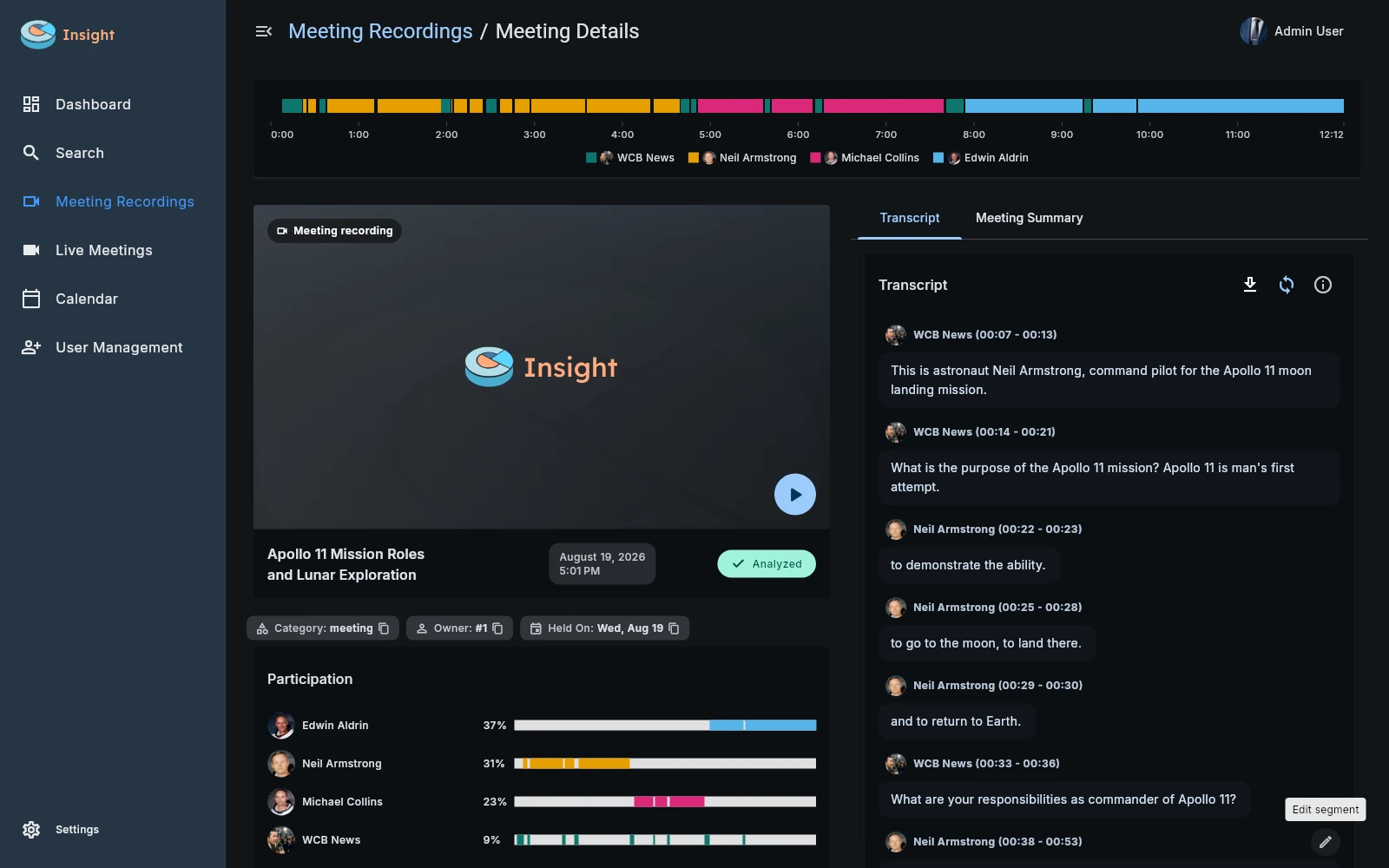
In this Apollo 11 recording, the interviewer and three astronauts become four distinct speakers. Their words stay beside the recording, ready to read and review.

Explore recording & transcription
Integrify Insight meeting details for the Apollo 11 recording, showing four speakers, a participation timeline, and the transcript. View screen
Recording & transcription
Integrify Insight meeting details for the Apollo 11 recording, showing four speakers, a participation timeline, and the transcript.

The recording, speaker timeline, participation, and timestamped transcript in one workspace.

  1. Separate the voices

    Insight works from the audio itself, without a participant list or pre-enrolled voices.

  2. Follow the exchange

    See which speaker asked a question and who answered it, with the surrounding dialogue intact.

  3. Keep the source close

    Use the transcript, timestamps, and playback together when you need to examine a detail.

02 / Understand how the conversation went

Bring your definition of a good conversation.

A customer may hear a product message without having their needs understood. A representative may mention follow-up without agreeing a next step. Your analysis can explore what happened and whether it met the expectations your company sets.

Start with useful notes, decisions, and actions. Add a deeper assessment when you need to examine quality. A scorecard, for example, evaluates individual requirements with evidence, calculated scores, and optional Precision and Arbiter reviews.

01

Evaluate what matters to your company

Use your methodology, approved information, and the evidence each requirement needs.

02

Give managers findings they can use

Review the supporting conversation, understand what was missed, and use specific guidance for coaching.

Explore conversation analysis
Your definition of a good conversation

A complete review, step by step.

  1. 01
    Company standards

    What matters, what counts as success, and what earns points

  2. 02
    Focused evaluation

    Examine each requirement and explain it with conversation evidence

  3. 03
    Completeness checks

    Make sure the required answers and supporting details are present

  4. 04
    Precision + Arbiter Optional

    Take a second look and resolve scoring disagreements

  5. 05
    Consistent scores

    Calculate totals from the accepted results using your scoring rules

Evidence for review. Results for action.

03 / Find the knowledge when you need it again

The question comes back. The knowledge is still there.

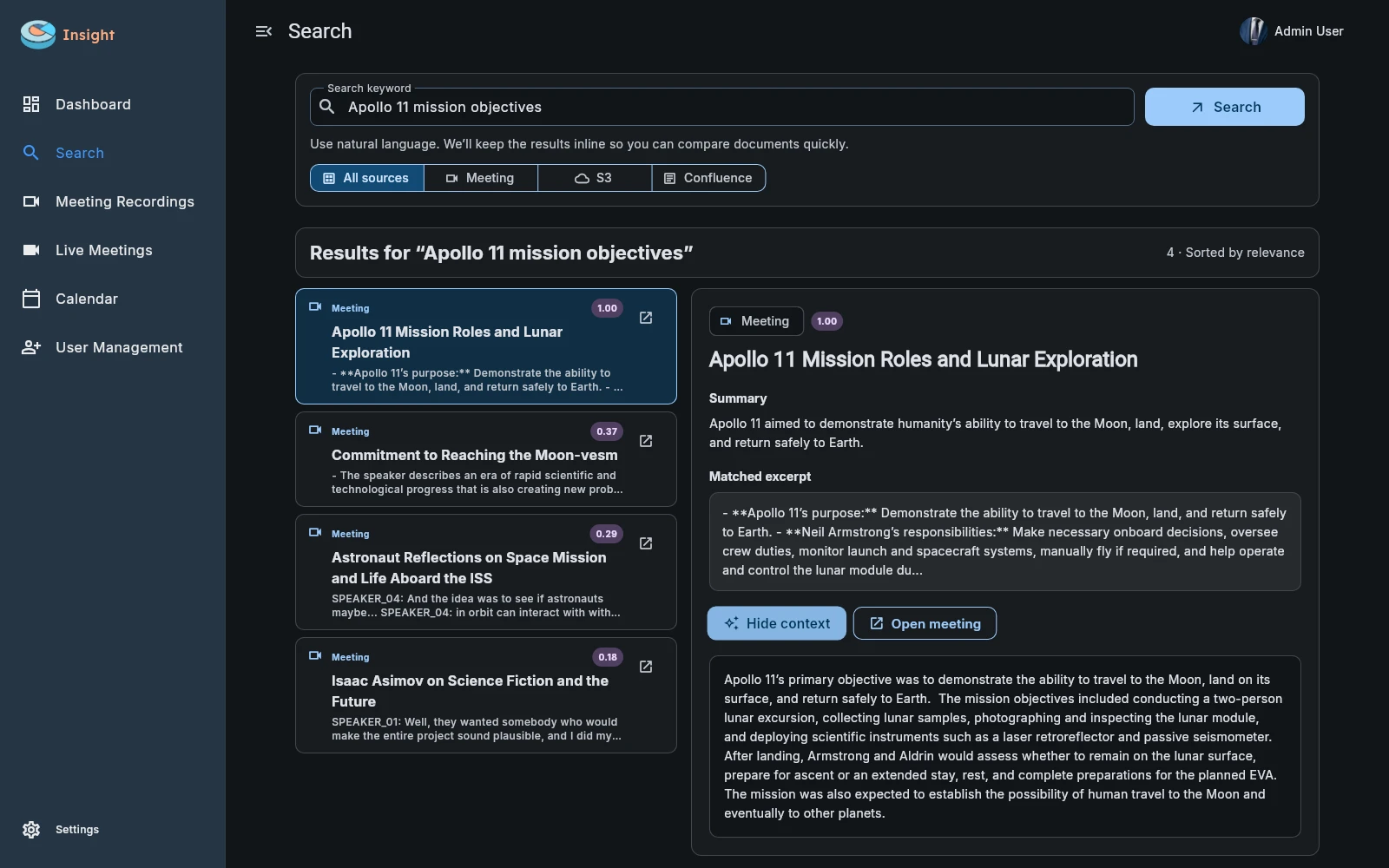
Later, you want to revisit the purpose of the Apollo 11 mission. You remember the subject, not the recording’s name. A search for ‘Apollo 11 mission objectives’ brings the relevant conversation back into view.

The expanded context shows why that result matters. The same search can reach across your indexed meetings, uploaded documents, Confluence pages, and connected file storage.

Explore knowledge search
Search results for Apollo 11 mission objectives in Integrify Insight, with the selected meeting result and its question-specific context expanded. View screen
Knowledge search
Search results for Apollo 11 mission objectives in Integrify Insight, with the selected meeting result and its question-specific context expanded.

Apollo 11 mission objectives: ranked results with the selected source’s context expanded.

  1. Start with what you remember

    Exact references, words in the content, spelling variations, and meaning all help find a match.

  2. Understand before opening

    Read the excerpt and expand the context relevant to your question.

  3. Continue at the source

    Open the meeting or document when you want to examine the original material.

Built for real business conversations

Different teams.
Standards of their own.

Pharmaceutical commercial teams

Thousands of doctor calls.
A consistent way to review them.

Evaluate pharmaceutical representatives’ conversations with doctors against approved commercial criteria. Give managers the evidence to focus their review and coaching.

Explore pharma doctor-call analysis
~2,000recorded doctor calls per day

Pharma pilot scale · capacity can grow with the workload

Fits your environment

Your conversations.
Your deployment choices.

Connect corporate accounts, manage access, and exchange results with your business systems through APIs and webhooks.

Deployment & integrations
Cloud
Private cloud
Self-hosted
Hybrid

A few useful answers

Start with
your questions.

Can we use our own evaluation criteria?

Yes. Your company defines the requirements, success conditions, points, and reference material. Different meeting types can use different analyses and scorecards.

Does Insight work with in-person recordings?

Yes. Speaker separation works from the audio itself, without a meeting-platform participant list or separate audio channels. Reviewers can correct transcript text and speaker assignments before reanalysis.

What can we generate from one meeting?

One conversation can produce useful notes, summaries, decisions, recommendations, and next steps. It can also support a detailed evaluation against your standards. A scorecard is one example, with explained grades and supporting evidence. Choose the analyses that serve your team’s purpose.

How are the scores checked?

Software validates required results and calculates totals from accepted grades. Optional Precision review checks the assessment, and Arbiter review resolves score disagreements. Reviewers can inspect the supporting evidence and correct source material where needed.

Can we connect our existing knowledge and systems?

Search covers indexed meetings, uploaded documents, Confluence, and S3-compatible storage. APIs and meeting-event webhooks support custom connections with business systems.

Can Insight run in our own environment?

Cloud, private-cloud, self-hosted, and hybrid deployments are supported. Platform components, processing services, access controls, and capacity are configured around your team’s requirements.

See Insight in action

Bring your conversations. Define your standards.

See how recordings become clear transcripts, detailed evaluations, and knowledge your team can find again.

Request a demo